
Note: This camera requires a UTC compatible recorder to access the OSD menu.
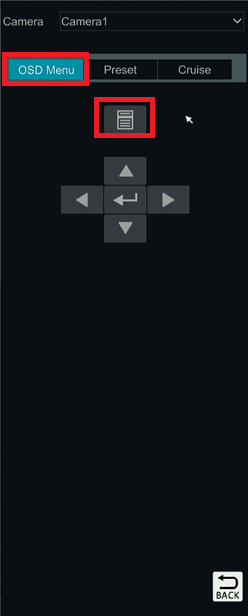
- First navigate to the OSD menu of the camera.
-
In a Speco hybrid blue series recorder, this will be done by right clicking on the camera feed>PTZ control>OSD Menu>Paper Icon

-
Once in the OSD menu, navigate to the Smart LED option.

-
Under Mode set this to manual with a value of 0 to turn it off. Values 1-10 will have the light on constantly with varying brightness levels.

-
Once set, the LED will no longer turn on automatically.
Note: Please keep in mind that this camera does not have infrared lights so the picture at night will not be visible without supplemented light.
Initial Submission Date: July 30th, 2026

Article authored by Michael Pagano, Technical Support Agent