
IP/Channel Conflict occurs when two cameras on a network share the same IP address.
This can be caused by several different factors:
-
Cameras may have been added twice to the recorder
-
The static IP address that was assigned may conflict with the DHCP range
-
Manually assigned static IP addresses may already be in use by another device
-
The built -in POE port on the recorder assigns an IP that conflicts with the LAN
-
A channel is reserved but empty
-
Following a firmware update, recorder may have reverted to the default IP address which may be in use by another device
-
Dual NIC recorders can be misconfigured causing both ports to use overlapping IPs
- Click the Start button (hamburger icon) > Click Settings

-
Navigate to the Camera

Step 4:
-
Look for any cameras that may have the same/conflicting IP addresses. If you have conflicting IP addresses, the addresses will have to be changed
Step 5:
-
If on the same network as the cameras, use an IP scanner to find the cameras on that network

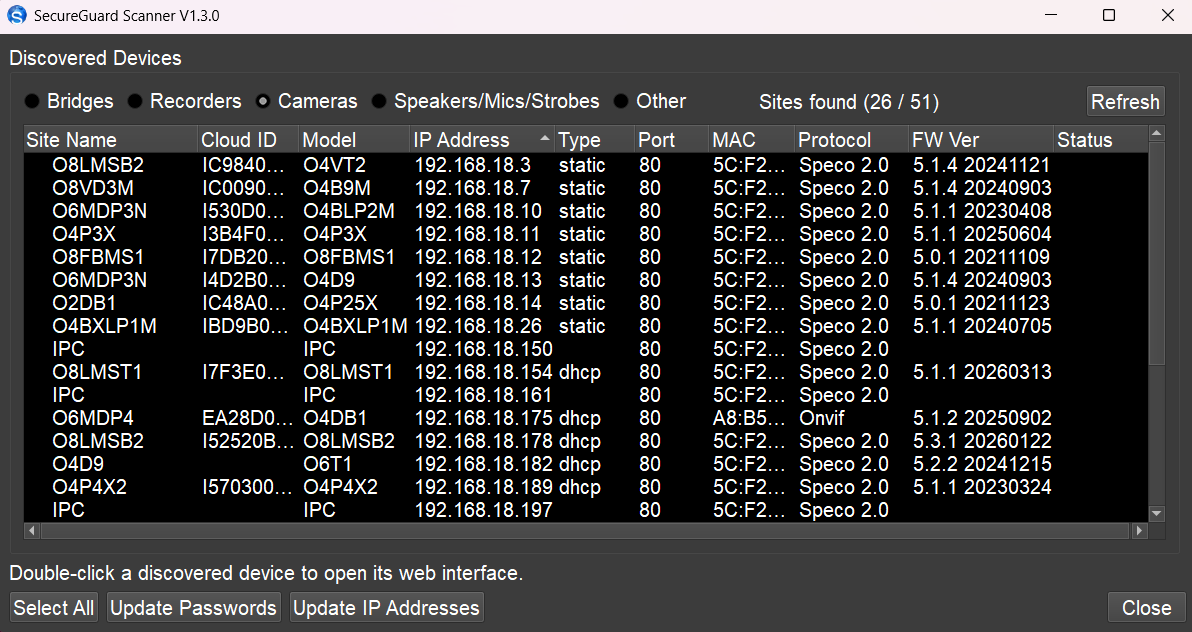
IP scanners can be found here on our website:
SecureGuard IP Scanner | Speco Blue Scanner
Step 6:
-
Use the IP scanners to locate and log into the camera:

Step 7:
-
Once logged into the camera successfully, static the IP address of the camera. Make sure that the ip address is on the same scheme as the recorder. For example: If the recorder is on a 192.168.226.x scheme, the camera should be set to an address within the 192.168.226.x scheme as well

The guide for assigning a static address can be found here:
How to Assign an IP Camera with a Static IP Address
Step 8:
-
Return to Add Camera. Click on Add Manually. Enter the IP address of the cameras that you just changed. Enter the password for the camera: it would be the default password of 1234 or if you changed the password, enter that password. Click add.
-
If cameras are on an external switch and the switch is plugged directly into the recorder, plug and play settings will need to be configured
Click the below link for a guide on how to configure those plug & play settings:
How to Connect Cameras on an External Switch
Initial Publish Date:  December 29, 2025

Published by: Dominik Holt, Techincal Support - Tier 1