
- Log into your recorder and select Settings

-
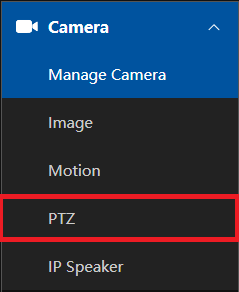
Under Camera, select PTZ
-
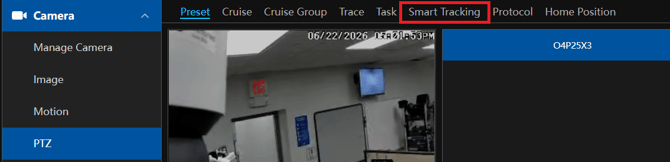
Select Smart Tracking
-
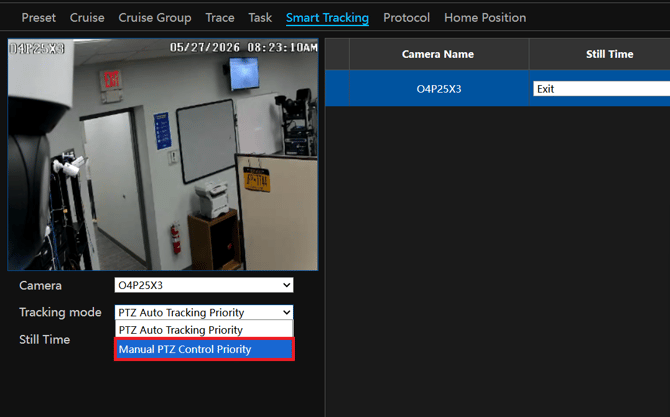
Change the tracking mode from PTZ Auto Tracking Priority to Manual PTZ Control Priority
-
Go to the analytic you would like to trigger the auto tracking, make sure you properly set up the analytic and select Trigger Track. The lock button must be locked for the auto tracking to work (button will display Unlock).
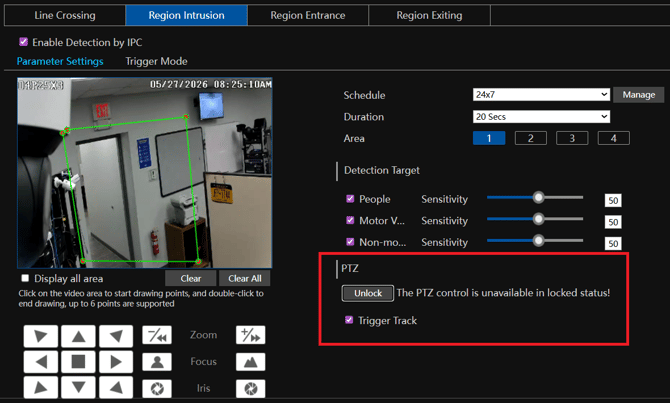
- You will now be able to manually control the PTZ camera, while still having the auto tracking triggered from your analytics.
NOTE: Only manual control and auto tracking will work. Calling presets and cruises will not.
Initial submission Date: June 22nd, 2026

Article authored by: Kevin Holland, Technical Support Lead