
-
First, ensure that you have the desired orientation of cameras on your camera grid.
- A grid can be established by pressing the split box icon.

- Cameras can be rearranged by clicking and dragging the camera views OR by clicking on a camera view first and then clicking the desired camera name from the list
- To switch between a named list and numbered cameras, press the icon next to the recorder drop down menu.

- Different cameras from other recorders can also be selected by clicking on the recorder drop down menu.

-
Once the desired camera layout is specified, now proceed to save it.
-
navigate to the "!" Icon along the bottom bar of the app.
-

-
Select the "Add Favorites" option

-
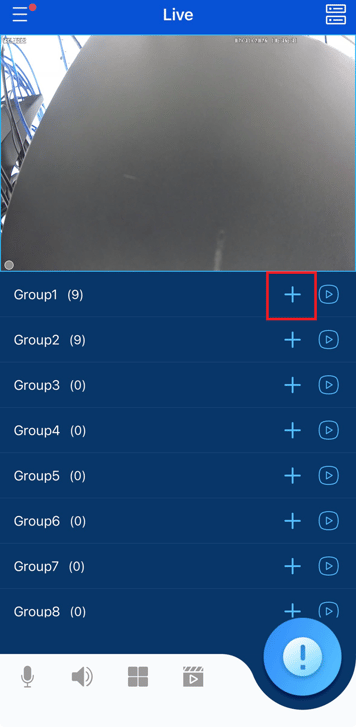
Selecting the "+" Icon next to a group will Save your current layout to that group
-
To modify the name, press and hold on the group.
-
To load a preset, press the Play Icon next to the +.
-

Initial Submission Date: July 31st, 2026

Article authored by Michael Pagano, Technical Support Agent