
This will only work on Speco Blue NVRs, it is not currently compatible with our Speco Blue Hybrid Recorders
Step 1: Locate the IP address of the camera. This can be done with the quick add menu of the recorder, using our camera scanners, or by plugging it directly into the PoE port of the recorder.

- The O4FDMS1 will only add to a single channel if you use quick add or plug it directly into the POE port of the recorder. If connecting directly to a PoE port, follow the steps below to add the second sensor.
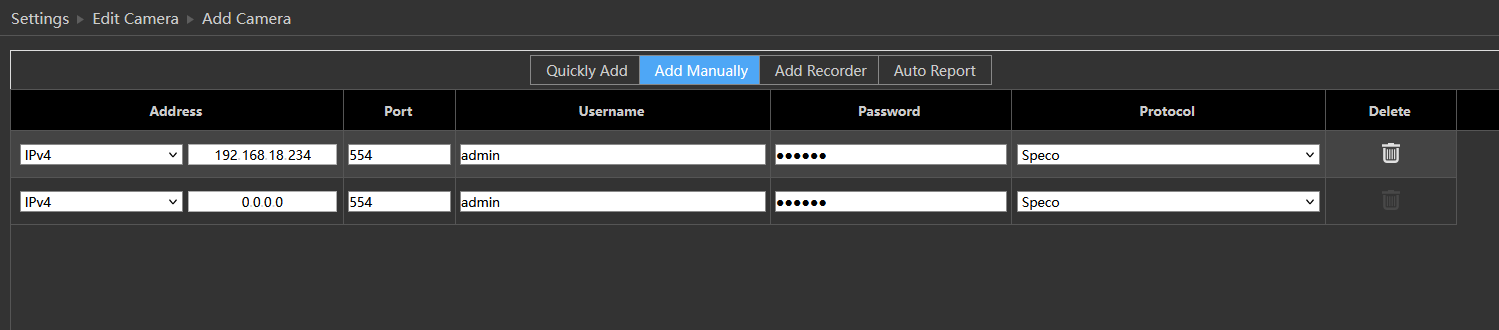
Step 2: Go to Camera > Add Camera > Add Manually. Enter the IP address, username and password.
Step 3: Leave All selected in the camera configure menu that will pop up and select OK.
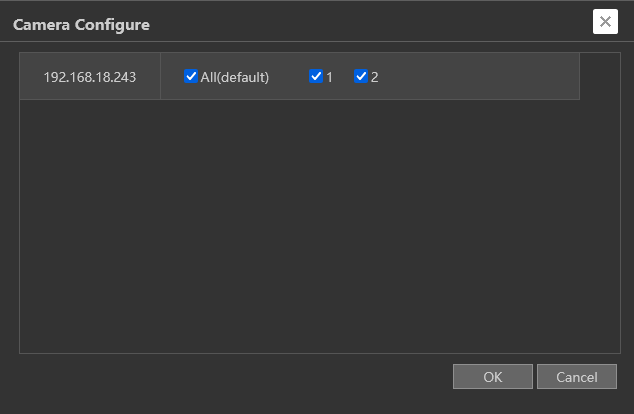
Step 4: You will now have both cameras added on separate channels. Each camera can now be configured individually with different analytics, schedules, etc.

Initial submission Date: April 24th, 2026

Article authored by: Kevin Holland, Technical Support Agent - Tier 1